United Kingdom

Sky Glass IPTV – Explore IPTV Subscriptions in the UK

Looking for Sky Glass IPTV in the UK? Explore internet-based television options, compare subscription plans and find guidance for setting up a compatible streaming device. Whether you live in London, Manchester, Birmingham, Glasgow, Cardiff or elsewhere in the United Kingdom, start by checking the available package, device requirements and service terms.

Sky Glass IPTV helps UK visitors understand their subscription options and get started with a compatible IPTV player. You can explore the available features, review installation guidance and contact support if you need help configuring your device.

Explore subscription options, check compatibility and choose a package that suits your viewing setup.

UK Pricing Plans - Sky Glass IPTV Subscription

Enjoy flexible viewing with our Sky Glass IPTV plans in the UK. Pick a subscription that suits you best—monthly, quarterly, six-month, or yearly. Watch your favourite shows whenever you like. Sign up today and make entertainment easy.

12 months + 1 month free

£45

Best for: Customers who have assessed the service and prefer an annual plan.

  • Duration: 12 months
  • Rooms: Single Room
  • Devices: Fire TV, Android TV, Smart TVs, phones, tablets and computers (check your model)
  • Connections: 1 Login works for 1 device only at a time
  • Renewal: check the published subscription conditions
Choose 12-Month Plan

6 months + 1 month free

£30

Best for: Customers considering a longer subscription period.

  • Duration: 6 months
  • Rooms: Single Room
  • Devices: Fire TV, Android TV, Smart TVs, phones, tablets and computers (check your model)
  • Connections: 1 Login works for 1 device only at a time
  • Renewal: check the published subscription conditions
Choose 6-Month Plan

3 months

£20

Best for: Viewers looking for a medium-term option.

  • Duration: 3 months
  • Rooms: Single Room
  • Devices: Fire TV, Android TV, Smart TVs, phones, tablets and computers (check your model)
  • Connections: 1 Login works for 1 device only at a time
  • Renewal: check the published subscription conditions
Choose 3-Month Plan

1 month

£10

Best for: Viewers who prefer a shorter subscription period.

  • Duration: 1 month
  • Rooms: Single Room
  • Devices: Fire TV, Android TV, Smart TVs, phones, tablets and computers (check your model)
  • Connections: 1 Login works for 1 device only at a time
  • Renewal: check the published subscription conditions
Choose 1-Month Plan

For Multi Room Subscription. Visit the subscription page.

Explore Live TV, Films and Series

Internet Protocol Television (IPTV) delivers television content over an internet connection. Depending on the service, subscription and content permissions, compatible players may provide access to live television, sports, films, series and other entertainment.

With Sky Glass IPTV, you can review the available subscription features before deciding which option suits your household. Check the current catalogue and package terms if particular channels, programmes or sporting events matter to you.

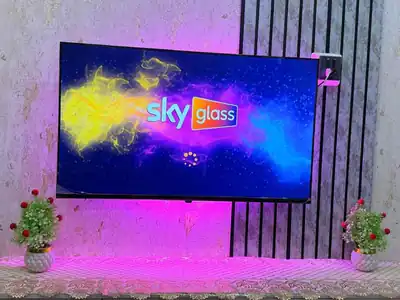
Sky Glass IPTV splash screen on a wall-mounted television
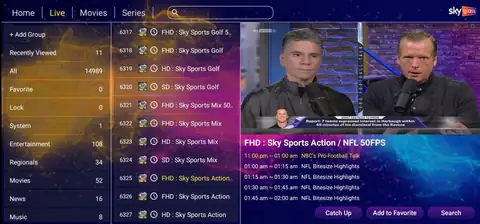
Sky Glass IPTV live TV screen with channel categories, channel list and programme guide
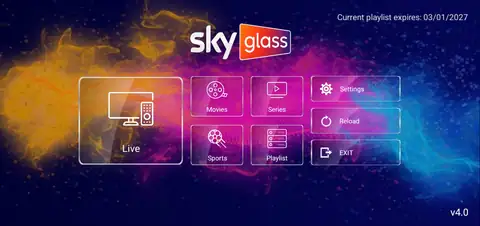
Sky Glass IPTV home menu with Live, Movies, Series, Sports and Playlist

Live Television

Explore the live television categories available through your selected package. Availability depends on the service and its authorised content catalogue.

Sports and Entertainment

Review available sports and entertainment listings before subscribing. Check the current package details if you want access to a specific competition, event or channel.

Films and TV Series

Browse the available on-demand catalogue through a compatible player. Individual titles and availability may change, so confirm that the content you want is included.

TV Guide and Catch-Up

Compatible services and players may support an Electronic Programme Guide (EPG), favourites and catch-up viewing. Features depend on the supplied service and available programme data.

Sky Glass IPTV Subscriptions for UK Viewers

Choosing an IPTV subscription involves more than comparing the headline price. Consider the subscription period, supported devices, number of simultaneous connections, renewal conditions and available support.

Compare before you pay

Explore our subscription page to compare the current packages and confirm exactly what each plan includes before paying.

What to check before ordering:

  • Total price and subscription duration
  • Number of screens permitted to stream simultaneously
  • Compatible devices and IPTV applications
  • Available channels and on-demand content
  • Picture quality supported by your setup
  • Activation process, renewal terms and refund policy

IPTV Across England, Scotland, Wales and Northern Ireland

Sky Glass IPTV is intended for viewers across the United Kingdom who want to understand their internet television options and set up a compatible device. Your location can affect broadband availability and performance, but your city alone does not determine the quality of a stream.

Sky Glass IPTV in England

From London and Birmingham to Manchester, Liverpool, Leeds, Bristol, Sheffield and Newcastle, viewers can compare IPTV subscription options and device requirements. A suitable broadband connection, compatible player and clear subscription terms are important wherever you live in England.

Sky Glass IPTV in Scotland

Viewers in Glasgow, Edinburgh, Aberdeen, Dundee and other Scottish communities can use our online guidance to review compatible devices and subscription details. Check your broadband performance and the requirements of your chosen player before getting started.

Sky Glass IPTV in Wales

Whether you live in Cardiff, Swansea, Newport or elsewhere in Wales, you can explore the available packages and installation instructions online. Actual streaming performance depends on your internet connection, home network, device and content source.

Sky Glass IPTV in Northern Ireland

Viewers in Belfast, Derry/Londonderry, Lisburn and other parts of Northern Ireland can review the same published subscription information and compatibility guidance. Confirm the package features and supported setup before placing an order.

Serving UK Households Online

You do not need to live in a particular city to consult our online subscription information. Our website provides package details, device guidance and contact options for visitors across the UK.

Local broadband availability and speed vary by address. If you experience buffering, test your connection and check your Wi-Fi signal before assuming that the issue comes from the IPTV player.

Compatible Devices for IPTV Streaming

The right setup depends on your device, operating system and chosen IPTV player. Check compatibility before purchasing a subscription or paying for a separate application licence.

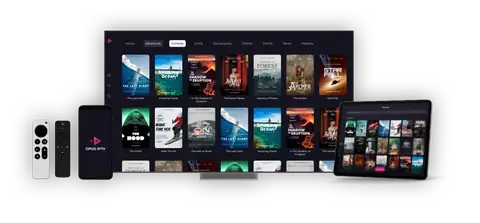
Streaming app shown on a television, phone, tablet and remote controls

Amazon Fire TV and Fire TV Stick

Check whether your Fire TV model supports the required application. Follow the relevant installation instructions and enter the account details supplied for your service.

Android TV and Android Devices

Compatible Android TV devices, TV boxes, phones and tablets may support IPTV players. Check the application requirements and your device's operating system version.

Samsung and LG Smart TVs

Smart TV compatibility varies by model and operating system. Check the television's app store and the installation guide. If the required player is unavailable, a compatible external streaming device may be necessary.

Apple Devices

Check the supported applications and current device requirements before setting up IPTV on an iPhone, iPad or Apple TV.

Windows and Mac Computers

A compatible player may allow you to use an IPTV service on a computer. Follow the relevant setup instructions and use the correct account details.

How to Get Started with Sky Glass IPTV

Getting started is easier when you check the essential details first.

  1. 1

    Step 1: Review the subscription plans

    Compare the available packages, prices, subscription periods and simultaneous connection limits.

  2. 2

    Step 2: Confirm your device

    Check whether your television, Fire TV Stick, Android device or other hardware supports the required player.

  3. 3

    Step 3: Review the service terms

    Confirm content availability, payment requirements, renewal conditions and refund terms before purchasing.

  4. 4

    Step 4: Complete the setup

    Follow the installation guide and enter the correct service details. Contact support if you need help with a supported configuration.

  5. 5

    Step 5: Check playback

    Test the available channels and features using your own device and internet connection. Picture quality and playback performance can vary.

What to Check Before Choosing an IPTV Provider

Choosing an IPTV service should involve checking more than the number of channels advertised.

  • Content authorisation: Confirm that the provider has the necessary rights to supply the channels and programmes offered in your territory.
  • Transparent pricing: Check the full upfront cost, subscription length and any additional charges.
  • Device compatibility: Verify the application, hardware and operating system requirements.
  • Connection limits: Confirm how many screens can stream at the same time.
  • Performance expectations: Remember that broadband speed, Wi-Fi quality, network congestion and source quality can affect playback.
  • Customer support: Check how to contact the provider about account access, billing or installation.
  • Policies: Read the terms, privacy policy and refund policy before ordering.

These checks help you make an informed decision and understand what you are purchasing.

Why Explore Sky Glass IPTV?

Our website brings together the information you need to assess an IPTV setup before choosing a subscription.

  • Published subscription options and package information
  • Guidance for compatible streaming devices
  • Installation instructions for supported setups
  • Information about available service features
  • Contact options for setup and account questions
  • UK-focused content for visitors across the four nations

Review the available details carefully and ask questions before paying if any part of a package is unclear.

Frequently Asked Questions

Sky Glass IPTV is the name used on this website for its IPTV-related subscription offering and setup information. Review the published package details to understand the service, available content and requirements before ordering.

The website provides online information for visitors across England, Scotland, Wales and Northern Ireland. Actual access and performance depend on the service terms, content permissions, compatible equipment and internet connection.

IPTV delivers content over an internet connection rather than relying on satellite reception. You generally need a compatible device, an appropriate player and valid service details.

Many Fire TV Stick models support compatible IPTV players. Check your model, operating system and the application's requirements before subscribing.

No. A 4K-capable television does not guarantee a 4K stream. The source, subscription, player, device and internet connection all affect the resolution available.

The required speed depends on the stream quality, household usage and stability of your connection. Other devices sharing your broadband can affect playback. Test your connection and check the provider's guidance for your intended resolution.

No. Content availability can change. Check the current catalogue and ask the provider to confirm important channels, events or titles before purchasing.

Compare the total price, duration, simultaneous connections, supported devices, content availability, renewal conditions and refund policy. Choose a package based on your actual viewing requirements rather than headline claims alone.

Visit the Installation Guide and follow the instructions for your device and compatible player. Contact the support team if you need assistance with a supported setup.

Explore Your IPTV Options

Ready to review the available packages? Compare subscription terms, check your device and read the relevant policies before making a decision.

Choose a subscription with clear terms and a setup that suits your household.